
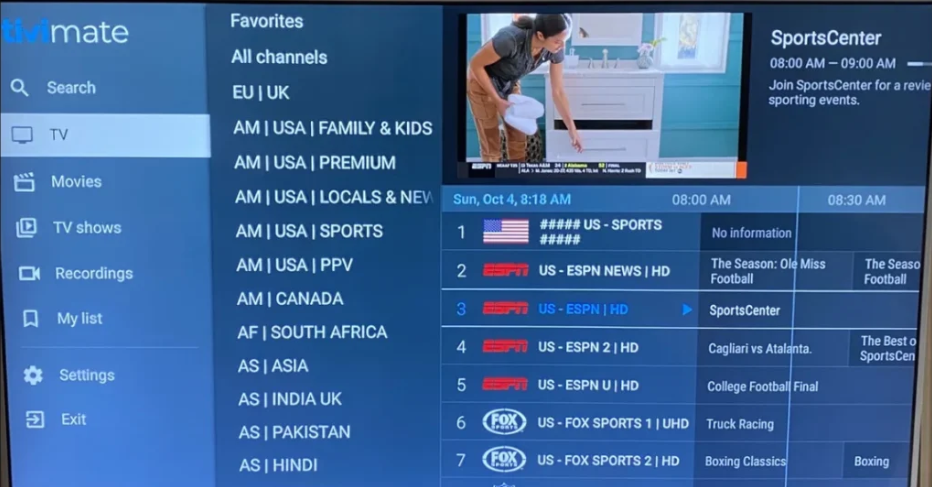
If you are serious about cutting cable and streaming live TV the right way, the TiviMate IPTV player is the app the big IPTV 4K team recommends above everything else. Here is a number that puts the whole market into perspective: 26 million+ combined downloads were recorded for just 36 IPTV apps, including TiviMate, targeted in a major April 2026 Google and Amazon crackdown — proof that demand for this technology is absolutely massive and growing fast. Pair TiviMate with the right service and Your streaming experience changes completely.
Key Takeaways
| Question | Answer |
|---|---|
| What is TiviMate IPTV player? | TiviMate is a Premium Android-based IPTV player that lets You load M3U playlists or Xtream Codes to access live channels, VOD, and EPG data. |
| What devices support TiviMate? | Android TV, Firestick, Fire TV Cube, Google TV, and any Android device running Android 5.0 or higher. |
| Do I need a paid IPTV subscription for TiviMate? | Yes. TiviMate is the player; You also need the best iptv subscription to fill it with 65,000+ channels and VOD. |
| Is TiviMate free or paid? | There is a free version. The Premium version (TiviMate Companion) unlocks Multi-View, catch-up TV, unlimited playlists, and more. |
| What IPTV service works best with TiviMate? | iptv4k is built for TiviMate — with Anti-Freeze Technology 2.0, Xtream Codes support, and instant activation. |
| Can I try before I buy? | Absolutely. Grab a no-credit-card free trial and test the full service on TiviMate within 15 minutes. |
| How much does a quality IPTV subscription cost? | Plans start at $24 for 3 months. A 12-month plan is just $59 — vs. the $2,535/year average cable TV bill. |
What Makes TiviMate IPTV Player the Best Streaming App in 2026
Simple answer: nothing else comes close on Android TV and Firestick. The TiviMate IPTV player gives You a clean, fast interface that cable TV companies would charge hundreds for.
It supports M3U URL playlists, Xtream Codes API, and catch-up TV out of the box. The Electronic Program Guide (EPG) integration is flawless. You always know what is on, what is coming next, and what You missed.

The big IPTV 4K team uses TiviMate daily. It is our first recommendation for every subscriber — from first-timers to power users who want advanced features like Multi-View and automated EPG refresh.
- M3U URL support — load any playlist instantly
- Xtream Codes — direct login with username and password
- EPG integration — full program guide in real time
- Catch-up TV — watch what You missed up to 7 days back
- Multi-View — watch multiple channels at the same time
- 4K/FHD/HD/SD quality auto-switching
Best IPTV Subscription to Pair with TiviMate IPTV Player
TiviMate is the player. But without the right service behind it, You are just looking at an empty screen. The best iptv subscription fills that screen with 65,000+ live channels, a massive VOD library, and sports in 4K — all powered by Anti-Freeze Technology 2.0.
Ll best iptv subscription plans include the SAME premium features — 65,000+ channels, 4K sports, VOD library, Anti-Freeze technology, and 24/7 support. The only difference is duration and savings.
| Plan | Duration | Price | Best For |
|---|---|---|---|
| Starter | 3 Months | $24 | Testing TiviMate with a real subscription |
| Popular | 6 Months | $39 | Regular streamers who want solid savings |
| Best Value | 12 Months | $59 | Maximum savings vs. cable TV |
| Ultra Saver | 24 Months | $99 | Power users who never want to worry again |
Choose longer iptv4k subscription to maximize Your savings vs cable TV. High-quality operation without interruptions is 100% guaranteed.
How to Set Up TiviMate IPTV Player: Step-by-Step IPTV Set Up Guide
Good news — the iptv set up process for TiviMate takes less than 10 minutes. We have tested this on every major device. Here is exactly how to do it.
Five-step visual guide to set up TiviMate IPTV Player. Follow the infographic to configure channels, playlists, and EPG quickly.
- Download TiviMate — Find it on the Google Play Store (Android TV) or sideload it on Firestick via Downloader.
- Open TiviMate and tap “Add Playlist” — You will see two options: M3U URL or Xtream Codes.
- Enter Your credentials — Use Your M3U URL or Your Xtream Codes server/username/password from iptv4k. You receive these with instant activation after subscribing.
- Set up Your EPG — Go to Settings, then EPG. Enter the EPG URL provided. Set the update interval to 12-16 hours (more on why this matters below).
- Organize Your channels — TiviMate auto-groups channels. Pin Your favorites. Make some popcorn and start your movie!
Need help? Our full iptv set up guide covers every device in detail. The big IPTV 4K team is always ready to respond 24 hours a day, seven days a week.
TiviMate IPTV Player Multi-View and EPG Power Features
This is where the TiviMate IPTV player separates itself from every other app. Power features that actually work — no crashes, no lag with the right subscription behind it.
Did You Know?
The Multi-View feature in TiviMate supports up to 9 simultaneous streams — though users report 4 screens is the stable limit for standard 4K hardware like Firestick 4K Max.
Source: Rush IPTV 2026
Multi-View is a game-changer for sports fans. Watch up to 4 live games simultaneously on one screen. No more switching channels and missing the goal.
Catch-up TV lets You rewind live broadcasts up to 7 days back. Missed the big match? Go back and watch it. This feature works perfectly with our iptv4k service because our servers store the content.
- EPG (Electronic Program Guide) — See what is on now, what is coming next, across all 65,000+ channels
- Favorites panel — Pin Your top channels for one-click access
- Parental controls — Lock channels with a PIN
- Recording — Record live TV directly to external storage (Premium feature)
- Auto-frame rate — TiviMate adjusts refresh rate automatically for 4K/FHD/HD/SD content
TiviMate IPTV Player Best Settings for Smooth Anti-Freeze Streaming
Even the best app needs the right settings. Here are the settings the big IPTV 4K team recommends for zero-buffer, anti-freeze performance.
EPG Update Interval: Set this to 12-16 hours. Do not go lower. Updating Your EPG every 2 hours can trigger a 24-hour server ban from Your IPTV provider.
Player Engine: Use ExoPlayer as Your default. It handles 4K H.265 streams the smoothest on Firestick and Android TV hardware.
- Set buffer time to 10 seconds minimum — this is Your safety net against micro-drops
- Enable auto-frame rate matching — essential for clean 4K playback
- Use hardware decoding — saves battery and reduces heat on Firestick
- Keep EPG data to 3 days if Your device has limited storage — especially on older Firestick models
- Set playlists to refresh every 24 hours — keeps Your channel list current without overloading servers
High broadcast quality is maintained by our Anti-Freeze Technology 2.0 on the server side — but these TiviMate settings make sure nothing gets in the way on Your device side either.
IPTV4K + TiviMate IPTV Player: Why This Combination Wins
You could use TiviMate with any provider. But the iptv4k service is specifically optimized for it. Xtream Codes support. Instant activation. EPG feeds ready to paste directly into TiviMate settings. No technical headaches.
Our iptv4k service delivers content across Europe, USA, Canada, Scandinavia, Arabic, Latino, Africa, Asia, and Australia. Check the full channels list to confirm Your region is covered.
“Our ultimate mission is your satisfaction.” That is not marketing language. Our Support works 24/24 and 7/7 to receive Your ticket and help You for all Your problems — including TiviMate configuration questions.
The ” adult bouquet “ is also available on request. Your personal addition requests are always welcome — if You want a specific movie or series added to the VOD library, just ask.
Stay away from deals that seem too good to be true. Cheap IPTV services that promise 200,000 channels for $5 a year do not have the server infrastructure to back it up. Only in iptv4k do You get the real combination of scale and stability.
Did You Know?
Experts recommend a 12-16 hour EPG update interval inside TiviMate. Updating more frequently — like every 2 hours — risks a 24-hour server ban from many IPTV providers, cutting off Your entire service.
Source: Reddit r/TiviMate 2026
TiviMate IPTV Player Free Trial — Test Before You Commit
The big IPTV 4K team offers a trial account with no credit card required. You get full access to 65,000+ live channels, VOD TV – Series, and 24/7 support — all running through Your TiviMate IPTV player setup.
Trial credentials arrive within 15 minutes of Your request. You test on the exact same servers, same channels, same quality as a paying subscriber. No downgraded trial feed. Real performance. Full picture.
Ready to test it right now? Contact us on WhatsApp and our team will get You your trial account activated instantly — day or night.
- No credit card required
- Credentials in 15 minutes or less
- Works on Firestick, Android TV, Fire Cube, Google TV, Smart TV
- Full VOD + live channels access during trial
- 24/24 support included
What to Watch With TiviMate IPTV Player and IPTV4K in 2026
The content library paired with a great TiviMate IPTV player setup is genuinely overwhelming — in the best way. Here is what You get access to in 2026.
- 65,000+ Live Channels — Sports, news, entertainment, kids, lifestyle, 24/7 channels
- 4K Sports — NFL, NBA, Premier League, Champions League, Formula 1 in Ultra HD
- VOD Library — 40,000+ movies and series updated regularly. New releases added constantly
- VOD TV – Series — Full seasons, not just single episodes
- International packages — Arabic, Latino, Scandinavian, Asian, African channels all in one place
- Catch-up TV — Miss a game? Watch it back within 7 days
Your personal addition requests are always welcome. If there is a specific show or movie You want in the VOD library, send us a message and We add it — only in iptv4k do You get that level of personal service.
Is TiviMate IPTV Player Worth It Compared to Cable in 2026
Cable TV in the USA costs on average $2,535 per year. A full 24-month iptv4k subscription costs $99 total. That is not a typo.
TiviMate (the app itself) with a Premium subscription costs a small one-time or annual fee. Pair it with iptv4k at $59 for 12 months and You are looking at a fraction of what the cable company charges for a worse experience.
| Feature | Cable TV | TiviMate + IPTV4K |
|---|---|---|
| Annual Cost | $2,535+ | From $59 |
| 4K Channels | Limited | 65,000+ |
| VOD Library | Extra subscription needed | Included |
| Multi-View | Not available | Up to 9 streams |
| Contract | 12-24 months locked | Flexible plans |
| Support | Business hours | 24/24, 7/7 |
Conclusion
The TiviMate IPTV player is, without question, the best app for consuming IPTV content on Android TV and Firestick in 2026. Clean interface. Rock-solid EPG. Multi-View. Catch-up. Everything a serious streamer needs.
But the app is only half the equation. The right iptv4k service — with Anti-Freeze Technology 2.0, 65,000+ channels, and a VOD library packed with content — is what transforms TiviMate into a full cable replacement.
We offer a 100% Risk-Free Guarantee. Start with a free trial, no credit card needed. Get Your credentials in 15 minutes. Test everything. Then choose the plan that fits Your budget. Choose a longer iptv4k subscription to maximize Your savings vs cable TV.
Have questions about the iptv set up process or want to request specific content? Reach out on WhatsApp anytime. Our Support works 24/24 and 7/7 — We are always here. Our ultimate mission is Your satisfaction.
Frequently Asked Questions
Is TiviMate IPTV player free to use in 2026?
TiviMate has a free version with basic features. To unlock Multi-View, catch-up TV, unlimited playlists, and recording, You need TiviMate Premium (TiviMate Companion app). The app cost is separate from Your IPTV subscription service.
What is the best IPTV service to use with TiviMate IPTV player?
The iptv4k service is specifically optimized for TiviMate — offering Xtream Codes support, M3U playlists, and EPG feeds that plug straight into TiviMate settings. With 65,000+ channels and Anti-Freeze Technology 2.0, it is the most stable pairing available in 2026.
How do I set up TiviMate IPTV player on Firestick?
You sideload TiviMate via the Downloader app on Firestick, then enter Your Xtream Codes credentials or M3U URL from Your IPTV provider. The full iptv set up guide walks You through every step — it takes less than 10 minutes total.
Why does my TiviMate IPTV player buffer or freeze?
Buffering usually comes from two sources: a slow internet connection (minimum 25 Mbps recommended for 4K) or an unreliable IPTV provider without proper anti-freeze infrastructure. Switching to iptv4k with Anti-Freeze Technology 2.0 resolves the provider side completely.
How often should I update the EPG in TiviMate?
Set Your EPG update interval to 12-16 hours inside TiviMate settings. Updating every 2 hours or more frequently risks triggering a 24-hour server ban from Your IPTV provider, which cuts off Your entire service.
Can I watch sports in 4K using TiviMate IPTV player with iptv4k?
Yes. The iptv4k service streams NFL, NBA, Premier League, Champions League, Formula 1, and more in 4K Ultra HD. TiviMate handles the 4K H.265 decoding smoothly using ExoPlayer — just make sure Your internet connection is at least 25 Mbps for stable 4K output.
Is TiviMate IPTV player worth it compared to cable TV in 2026?
Absolutely. Cable TV averages $2,535 per year in the USA. A full 12-month iptv4k subscription is $59 — and You get more channels, more content, and better picture quality. Paired with TiviMate, it is the smartest streaming decision You can make in 2026.
It’s impressive how some streaming apps can combine live channels, VOD, and EPG data all in one interface. Having everything organized in a single place really changes the way you navigate content and makes managing multiple streams much easier.
The perspective on the 26 million download figures really highlights how critical a stable backend has become now that the app itself is just the interface. It’s interesting how the distinction between the player software and the actual streaming infrastructure determines whether the experience feels seamless or prone to freezing. That mention of the 15-minute trial window seems like a smart way for users to validate that specific infrastructure before committing.